

 Anthem Blue Cross Phishing Campaign Deploys Ransomware
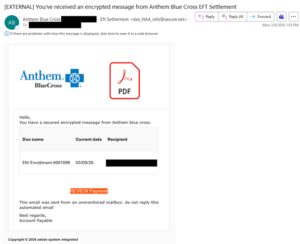
The NJCCIC observed an Anthem Blue Cross phishing campaign targeting New Jersey State employees. The sender’s display name includes Anthem Blue Cross, the target organization’s domain name, and “Eft Settlement.” However, the sender’s email address does not reference Anthem Blue Cross. The email signature purports to be from “Account Payable,” and the email contains other grammatical errors and is not personalized. The email claims that the target received an encrypted message for an EFT settlement that can be viewed in Adobe PDF format by clicking the “REVIEW Payment” link.
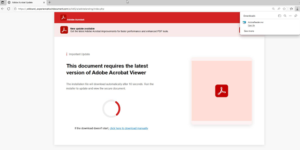
If the link is clicked, the target is directed to a malicious website, hxxps://_wildcard_[.]experiencetouhdecument[.]com/a/AdQ/a/adobelanding/index[.]php. To view the document, the website prompts the target to first install the latest version of Adobe Acrobat Viewer, unlike the proper name of Adobe Acrobat Reader. The fake Adobe installer, labelled as “AdobeReader.msi,” downloads automatically after 10 seconds.
If the fake Adobe installer file is clicked and installed, it loads a malicious executable. As the Adobe update page is displayed, several tasks and processes run in the background, unbeknownst to the target. In this campaign, threat actors use the trusted Adobe brand to evade detection and lure their target with a fake update. This fake update downloads the payload containing the ScreenConnect or UltraVNC remote monitoring and management (RMM) tools to gain initial access to user devices.
 Threat actors may leverage multiple legitimate RMM tools, either simultaneously or in sequence, as a strategic move to improve resilience, avoid detection, and ensure redundancy. The commercial ScreenConnect tool is typically used for initial access and persistence, especially in deploying ransomware, whereas the open-source UltraVNC tool is utilized as a secondary backdoor if the primary ScreenConnect tool is blocked.
This campaign also performs other stealthy tasks and processes, such as dropping or overwriting files in the Windows and Program Files directories, running PowerShell scripts and executing commands, gathering information (e.g., system, browser, and BIOS), escalating privileges, and accessing and modifying the registry and other data. Threat actors also target the Windows Volume Shadow Copy Service (VSS) that creates consistent snapshots (shadow copies) of files for backups while applications are running. Threat actors delete these backup snapshots before encrypting files in ransomware attacks, hindering recovery.
Recommendations
- Exercise caution with unexpected or unsolicited communications.
- Confirm requests from senders via contact information obtained from verified and official sources before taking any action, such as clicking links or opening attachments.
- Navigate directly to official and verified websites by typing the legitimate URL into the browser instead of clicking on links in messages.
- Keep systems and browsers up to date and apply patches after appropriate testing.
- Maintain robust and up-to-date endpoint detection tools on every endpoint.
- Consider leveraging behavior-based detection tools rather than signature-based tools.
- Utilize network segmentation to isolate valuable assets and help prevent the spread of ransomware and malware.
- Enforce the Principle of Least Privilege, disable unused ports and services, and use web application firewalls (WAFs).
- Establish a comprehensive data backup plan that includes regularly performing scheduled backups, keeping an updated copy offline in a separate and secure location, and testing it regularly.
Report ransomware and other malicious cyber activity to the NJCCIC and the FBI’s IC3.
Published in the NJCCIC Bulletin March 12, 2026
